
Multi category training guide
Welcome
This guide will help you understand how to capture proper photos for our multi category audits. Following these rules is critical for ensuring your submission is accepted.
Core requirements
- Strict orientation: All photos must be captured head-on and completely straight. The app will prevent you from taking extreme angled photos, but if an angled photo passes the app’s check, it will be rejected.
- Vertical format only: All photos must be taken vertically. Horizontal photos will not be accepted.
- Sectional overlap: All photos are required to have exactly 20% overlap of product from the adjacent section photo. 20% of overlap includes 2-3 products.
- Maximize viewable area: Show the full section from left to right, and the entire shelf from top to bottom, in every single photo. We must see a clear start and a clear end to every section so we can verify that no products were cut out of the category.
- Maintain consistent distance: Take every photo from the exact same distance so we can stitch the sectional photos together into a single panoramic view.
- No obstructions: Do not include movable obstructions like carts or other people that block any portion of the shelves. If there are people in the aisles, wait until they pass by. Move any items that can be moved out of the view of the photos. Ensure all fingers are clear of the camera view.
- Readability is key: Your priority is ensuring every photo is clear and shows all required products. Avoid large areas of empty space above or below the shelves.
- No blurry photos: Any photo containing significant blur, or glare will be rejected.
Example photos
Bad examples
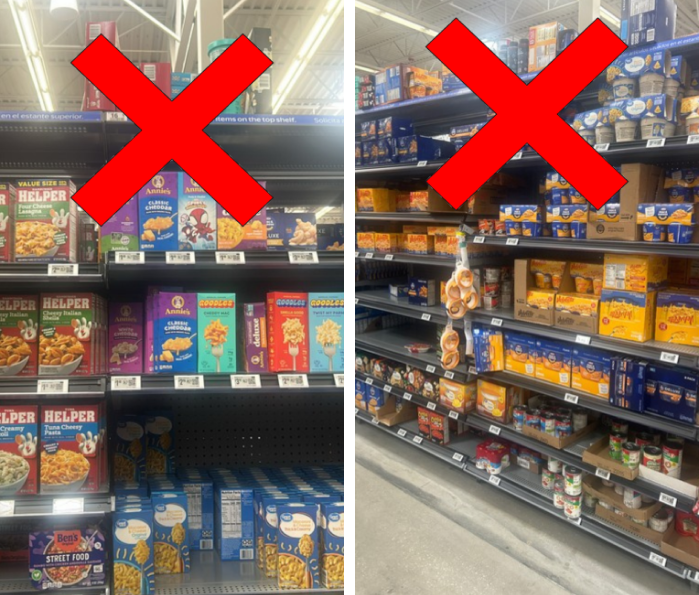
Do not take photos too close or at an angle.
Good examples
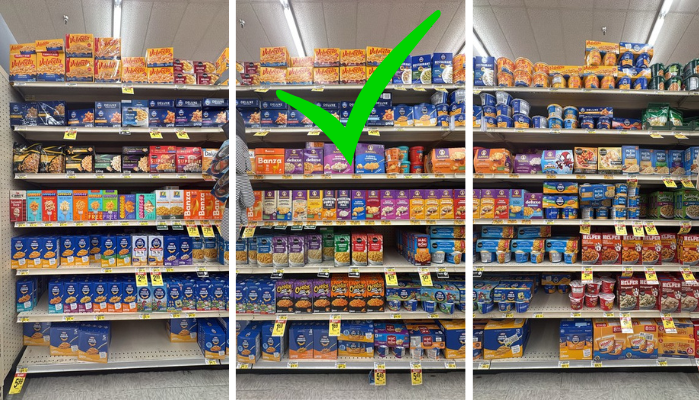
These photos are clear, head on, and show the full shelf from top to bottom. When moving from left to right like this the entire section will be properly shown.
Quick photo checklist before you submit
- Are all photos vertical?
- Are all photos clear and in focus?
- Does your photos show the full section from left to right?
- Does it include 20% overlap?
- Are there no people, carts, fingers or other obstructions in the photo?
If the answer is yes to all of these questions, then you are ready to submit your observation. Be sure to leave your app open until your observation is fully submitted.